




09 July 2026
|
8:10:45
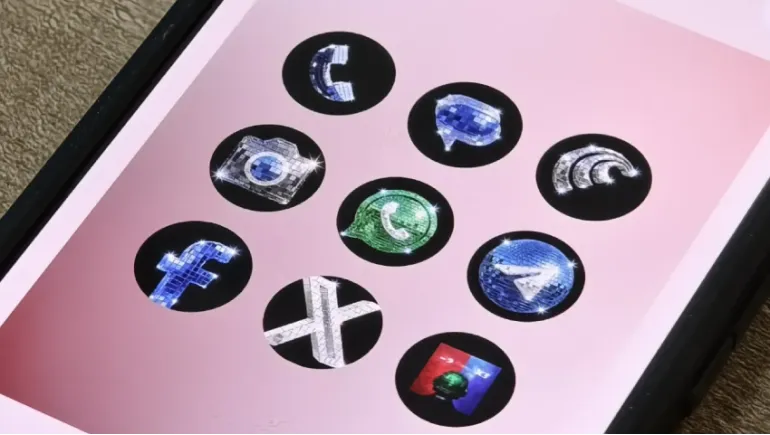
Not every product update has to be serious. On May 22, 2026, Google added something genuinely fun to Pixel phones and the origin story is as entertaining as the feature itself.
The custom icons feature rolled out in March's Pixel Drop Google's term for its periodic feature updates to Pixel phones introducing app icon templates like a hand-drawn "Scribbles" aesthetic, a gold look called "Treasure," a colorful painted style dubbed "Easel," and others.
The disco ball concept emerged from a social media moment. After Spotify's temporary new glittery icon drew mixed reactions, Google decided to get in on the joke. Android ecosystem head Sameer Samat announced the release on X, writing: "Your wish is our command. Disco icons available on Pixel as of today… Are y'all sure you still want this?" The post included a screenshot of a Pixel phone home screen fully decked out with the reflective, disco-ball-inspired icons, which have drawn mixed reactions from users some calling them "awful" and others saying "I'll take it!"
From a joking tweet to a live product update in under a week that is a product cycle most teams can only dream of.
The "Disco" icon pack on Google Pixel phones gives each icon an overhaul that delivers a disco ball effect on a black background. Every app from Chrome to WhatsApp to your calculator gets transformed into a glittery, reflective sphere that captures and scatters light in the style of a classic 1970s dance floor centerpiece.
The aesthetic is bold, unapologetic, and divisive in exactly the way a feature called "Disco" should be.
To get to these, you'll long-press on your home screen, choose "Wallpaper & style," select Icons, and then hit the Create button. Once in the Create menu, you should see the Disco option, as well as the others that were previously released.
The process takes under two minutes, and switching back to any other style or the default is equally straightforward. There is no permanent commitment required.
Understanding the technology behind the feature adds useful context. Unlike traditional Android icon packs, this system relies on AI to recreate icons based on preset styles. That keeps things simple, but it also limits customization. You're picking a vibe rather than fully controlling how each icon looks. Disco joins other styles like Scribbles, Stardust, Cookies, Easel, and Treasure, all of which use the same AI approach.
This AI-driven approach is the reason Google could deploy a brand-new icon style within days of a social media conversation. The underlying system does not require designers to manually redesign every app icon the AI applies the visual style to any icon it encounters, making new theme deployment remarkably fast.
Currently, the feature is exclusive to Pixel phones. Google has not announced plans to expand it to other Android devices. Pixel users who enjoy the broader Android icon pack ecosystem may find the curated selection limiting compared to the flexibility traditional icon packs offered, but the AI-powered consistency across all apps including third-party apps that traditional icon packs often missed is a genuine practical advantage.
Beyond the entertainment value, Disco icons signal something meaningful about Google's product culture in 2026. The willingness to take a social media joke from concept to shipped product in less than a week reflects an organization with genuine responsiveness and suggests that Pixel's customization feature pipeline will continue to surprise and delight users in ways that larger, more deliberate release cycles rarely allow.
For Pixel users who enjoy personalizing their devices, the custom icons ecosystem is only getting richer. Disco is the latest style, but it will not be the last.












Comments
There are no comments for this Article.